
Say it once. Sortpen sorts out the rest.
Tell Siri what needs doing. It lands on your family's board with the right person, the right day, and a reminder before it matters.
Works on iPhone, iPad and any web browser. Nothing to download from the App Store.
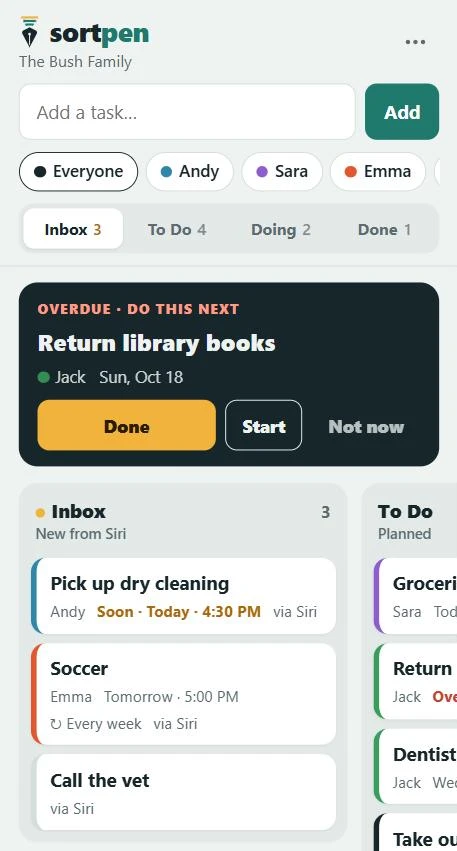
No typing. No forms. Just say it the way you'd say it out loud.
Sortpen understands who it's for, which day, what time, and whether it repeats. It even says back what it heard, so you know it got it right.
From "don't forget" to done, in three steps
Say it
"Hey Siri, Sortpen" then the task.
Dentist for Jack 10/28 at 9:30amworks. So doestake out trash every Monday.It lands sorted
New tasks drop into your Inbox with each person's color, the day and time, and a repeat if there is one. Drag them into To Do, Doing and Done.
Everyone gets a nudge
A reminder pops up on the right person's phone before each task, even when the app is closed.
Less to look at. Less to remember.
Most planners show you everything at once. Sortpen is built around a simpler question: what's the one thing to do next?
Do this next
One big card at the top shows the single most urgent task: overdue first, then what's coming up today. Tap Done and the next one appears. Tap Not now and it steps aside.
A board, not a wall of lists
Inbox, To Do, Doing, Done. Move a card with a drag or a tap, so progress is something you can see.
A color for every person
Glance at the board and know whose turn it is. Filter to one person when you only need their list.
Routines that reset themselves
Finish "feed the dog every day" and it goes straight back to To Do for tomorrow. Nothing to re-enter.
Reminders that find you
Lock-screen reminders 15 minutes before, or whenever you choose. Shared tasks remind every grown-up.
One board for the whole family
Invite your partner with a link. Everyone has their own login and sees the same board, live.
Good to know
Do I need to download an app?
No. Open sortpen.com on your phone and tap Share, then Add to Home Screen. It gets its own icon, opens full screen and can send reminders, all without the App Store.
How does the Siri part work?
You add a short Siri Shortcut once; Sortpen walks you through it step by step with screenshots. After that, "Hey Siri, Sortpen" adds anything you say to your board.
Does it work on Android?
The board and reminders work in Chrome on Android. Adding tasks by voice through Siri is iPhone and iPad only for now.
Can kids use it?
Yes. Add kids to your family so their tasks get their own color. Their reminders go to the grown-ups, so kids don't need a phone or an account.
When can my family start?
We're inviting families in small groups while we build. Join the early access list and we'll send your invite.
Get your family on the list
Leave your email and we'll send an invite when the next group of families gets access.
You're on the list.
We'll email you when it's your family's turn.